Thursday, 15 March 2012

SANs, LANs, MANs, and WANs


SANs, LANs, MANs, and WANs

Characterize Network

One way to characterize networks is according to their size. Two wellknown examples are LANs (local area networks) and WANs (wide area networks); the former typically extend less than 1 km, while the latter can be worldwide. Other networks are classified as MANs (metropolitan area networks), which usually span tens of kilometers. The reason such classifications are interesting is that the size of a network often has implications for the underlying technology that can be used, with a key factor being the amount of time it takes for data to propagate from one end of the network to the other; we discuss this issue more in later articles.


An interesting historical note is that the term “wide area network” was not applied to the first WANs because there was no other sort of network to differentiate them from. When computers were incredibly rare and expensive, there was no point in thinking about how to connect all the computers in the local area—there was only one computer in that area. Only as computers began to proliferate did LANs become necessary, and the term “WAN” was then introduced to describe the larger networks that interconnected geographically distant computers.

Another kind of network that we need to be aware of is SANs (system area networks). SANs are usually confined to a single room and connect the various components of a large computing system. For example, HiPPI (High Performance Parallel Interface) and Fiber Channel are two common SAN technologies used to connect massively parallel processors to scalable storage servers and data vaults. (Because they often connect computers to storage servers, SANs are sometimes defined as storage area networks.) Although this article does not describe such networks in detail, they are worth knowing about because they are often at the leading edge in terms of performance, and because it is increasingly common to connect such networks into LANs and WANs.

Friday, 9 March 2012

Bandwidth and Throughput


Bandwidth and 
Throughput


Bandwidth and throughput are two of the most confusing terms used in networking. While we could try to give you a precise definition of each term, it is important that you know how other people might use them and for you to be aware that they are often used interchangeably. First of all, bandwidth is literally a  measure of the width of a frequency band. For example, a voice-grade telephone line supports a frequency band ranging from 300 to 3300 Hz; it is said to have a bandwidth of 3300 Hz− 300 Hz = 3000 Hz. If you see the word “bandwidth” used in a situation in which it is being measured in hertz, then it probably refers to the range of signals that can be accommodated.

When we talk about the bandwidth of a communication link, we normally refer to the number of bits per second that can be transmitted on the link. We might say that the bandwidth of an Ethernet is 10 Mbps. A useful distinction might be made, however, between the bandwidth that is available on the link and the number of bits per second that we can actually transmit over the link in practice. We tend to use the word “throughput” to refer to the measured perfor- mance of a system. Thus, because of various inefficiencies of implementation, a pair of nodes connected by a link with a bandwidth of 10 Mbps might achieve a throughput of only 2 Mbps. This would mean that an application on one host could send data to the other host at 2 Mbps.

Finally, we often talk about the bandwidth requirements of an application—the number of bits per second that it needs to transmit over the network to perform acceptably. For some applications, this might be “whatever I can get”; for others, it might be some fixed number (preferably no more than the  available link bandwidth); and for others, it might be a number that varies with time. I will provide more on this topic later in this blog.

Keep reading^^….

Wednesday, 29 February 2012

Connectivity in Computer Network (Cont'd)


Connectivity

Connection

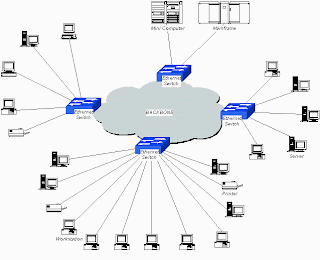
Connectivity (Cont'd). A second way in which a set of computers can be indirectly connected is shown in Figure interconnection network. In this situation, a set of independent networks (clouds) are interconnected to form an internetwork, or internet for short. We adopt the Internet’s convention of referring to a generic internetwork of networks as a lowercase i internet, and the currently operational TCP/IP Internet as the capital I Internet. A node that is connected to two or more networks is commonly called a router or gateway, and it plays much the same role as a switch—it forwards messages from one network to another. Note that an internet can itself be viewed as another kind of network, which means that an internet can be built from an interconnection of internets. Thus, we can recursively build arbitrarily large networks by interconnecting clouds to form larger clouds.

Interconnection Network
Interconnection Networks

Just because a set of hosts are directly or indirectly connected to each other does not mean that we have succeeded in providing host-to-host connectivity. The final requirement is that each node must be able to say which of the other nodes on the network it wants to communicate with. This is done by assigning an address to each node. An address is a byte string that identifies a node; that is, the network can use a node’s address to distinguish it from the other nodes connected to the network. When a source node wants the network to deliver a message to a certain destination node, it specifies the address of the destination node. If the sending and receiving nodes are not directly connected, then the switches and routers of the network use this address to decide how to forward the message toward the destination. The process of determining systematically how to forward messages toward the destination node based on its address is called routing.

This brief introduction to addressing and routing has presumed that the source node wants to send a message to a single destination node (unicast). While this is the most common scenario, it is also possible that the source node might want to broadcast a message to all the nodes on the network. Or a source node might want to send a message to some subset of the other nodes, but not all of them, a situation called multicast. Thus, in addition to node-specific addresses, another requirement of a network is that it support multicast and broadcast addresses.

The main idea to take away from this discussion is that we can define a network recursively as consisting of two or more nodes connected by a physical link, or as two or more networks connected by a node. In other words, a network can be constructed from a nesting of networks, where at the bottom level, the network is implemented by some physical medium. One of the key challenges in providing network connectivity is to define an address for each node that is reachable on the network (including support for broadcast and multicast connectivity), and to be able to use this address to route messages toward the appropriate destination node(s).

Friday, 17 February 2012

Connectivity in Computer Network


Connectivity

Starting with the obvious, a network must provide connectivity among a set of computers. Sometimes it is enough to build a limited network that connects only a few select machines. In fact, for reasons of privacy and security, many private (corporate) networks have the explicit goal of limiting the set of machines that are connected. In contrast, other networks (of which the Internet is the prime example) are designed to grow in a way that allows them the potential to connect all the computers in the world. A system that is designed to support growth to an arbitrarily large size is said to scale. Using the Internet as a model, this book addresses the challenge of scalability. 

Links, Nodes, and Clouds

 Network connectivity occurs at many different levels. At the lowest level, a network can consist of two or more computers directly connected by some physical medium, such as a coaxial cable or an optical fiber. We call such a physical medium a link, and we often refer to the computers it connects as nodes. (Sometimes a node is a more specialized piece of hardware rather than a computer, but we overlook that distinction for the purposes of this discussion.) As illustrated in Figure , physical links are sometimes limited to a pair of nodes (such a link is said to be point-to-point), while in other cases, more than two nodes may share a single physical link (such a link is said to be multiple access). Whether a given link supports point-to-point or multipleaccess connectivity depends on how the node is attached to the link. It is also the case that multiple-access links are often limited in size, in terms of both the geographical distance they can cover and the number of nodes they can connect. The exception is a satellite link, which can cover a wide geographic area.
point to point
Point to Point

Multiple Access
Multiple Access

If computer networks were limited to situations in which all nodes are directly connected to each other over a common physical medium, then either networks would be very limited in the number of computers they could connect, or the number of wires coming out of the back of each node would quickly become both unmanageable and very expensive. Fortunately, connectivity between two nodes does not necessarily imply a direct physical connection between them—indirect connectivity may be achieved among a set of cooperating nodes. Consider the following two examples of how a collection of computers can be indirectly connected.
Switched Network
Switched Network


Figure Switched Network shows a set of nodes, each of which is attached to one or more pointto- point links. Those nodes that are attached to at least two links run software that forwards data received on one link out on another. If organized in a systematic way, these forwarding nodes form a switched network. There are numerous types of switched networks, of which the two most common are circuit switched and packet switched. The former is most notably employed by the telephone system, while the latter is used for
the overwhelming majority of computer networks and will be the focus of this blog.

The important feature of packet-switched networks is that the nodes in such a network send discrete blocks of data to each other. Think of these blocks of data as corresponding to some piece of application data such as a file, a piece of email, or an image. We call each block of data either a packet or a message, and for now we use these terms interchangeably; we discuss the reason they are not always the same in next article. Packet-switched networks typically use a strategy called store-and-forward. As the name suggests, each node in a store-and-forward network first receives a complete packet over some link, stores the packet in its internal memory, and then forwards the complete packet to the next node. In contrast, a circuit-switched network first establishes a dedicated circuit across a sequence of links and then allows the source node to send a stream of bits across this circuit to a destination node. The major reason for using packet switching rather than circuit switching in a computer network is efficiency, discussed in the next subsection.

The cloud in Figure 1.3 distinguishes between the nodes on the inside that implement the network (they are commonly called switches, and their sole function is to store and forward packets) and the nodes on the outside of the cloud that use the network (they are commonly called hosts, and they support users and run application programs). Also note that the cloud in Figure 1.3 is one of the most important icons of computer networking. In general, we use a cloud to denote any type of network, whether it is a single point-to-point link, a multiple-access link, or a switched network. Thus, whenever you see a cloud used in  a figure, you can think of it as a placeholder for any of the networking technologies covered in this blog.

Wednesday, 1 February 2012

Requirements for Computer Network


Requirements 

We have just established an ambitious goal for ourselves: to understand how to build a computer network from the ground up. Our approach to accomplishing this goal will be to start from first principles, and then ask the kinds of questions we would naturally ask if building an actual network. At each step, we will use today’s protocols to illustrate various design choices available to us, but we will not accept these existing artifacts as gospel. Instead, we will be asking (and answering) the question of why networks are designed the way they are. While it is tempting to settle for just understanding the way it’s done today, it is important to recognize the underlying concepts because networks are constantly changing as the technology evolves and new applications are invented. It is our experience that once you understand the fundamental ideas, any new protocol that you are confronted with will be relatively easy to digest.

The first step is to identify the set of constraints and requirements that influence
network design. Before getting started, however, it is important to understand that the
expectations you have of a network depend on your perspective:
■ An application programmer would list the services that his or her application
needs, for example, a guarantee that each message the application sends will
be delivered without error within a certain amount of time.
■ A network designer would list the properties of a cost-effective design, for
example, that network resources are efficiently utilized and fairly allocated to
different users.
■ A network provider would list the characteristics of a system that is easy to
administer and manage, for example, in which faults can be easily isolated
and where it is easy to account for usage.

This post attempts to distill these different perspectives into a high-level introduction to the major considerations that drive network design, and in doing so, identifies the challenges addressed throughout the rest of this blog… happy reading^^..

Sunday, 15 January 2012

Introducing Web Applications


Web Applications

Web Applications
Web Applications

After knowing the fundamental of Computer Network, we move to web applications. Most people know the Internet through its applications: the World Wide Web, email, streaming audio and video, chat rooms, and music (file) sharing. The Web, for example, presents an intuitively simple interface. Users view pages full of textual and graphical objects, click on objects that they want to learn more about, and a corresponding new page appears. Most people are also aware that just under the covers, each selectable object on a page is bound to an identifier for the next page to be viewed. This identifier, called a uniform resource locator (URL), uniquely names every possible page that can be viewed from your Web browser. For example,

http://www.sharetelecommunication.blogspot.com/computer-network

is the URL for a page representing this book at Morgan Kaufmann: The string http indicates that the HyperText Transfer Protocol (HTTP) should be used to download the page, www.facebook.com is the name of the machine that serves the page, and computer-network uniquely identifies the page at the publisher’s site.

What most Web users are not aware of, however, is that by clicking on just one such URL, as many as 17 messages may be exchanged over the Internet, and this assumes the page itself is small enough to fit in a single message. This number includes up to six messages to translate the server name (www.sharetelecommunication.blogspot.com)  into its Internet address (xxx.xxx.xxx.xxx), three messages to set up a Transmission Control Protocol (TCP) connection between your browser and this server, four messages for your browser to send the HTTP “get” request and the server to respond with the requested page (and for each side to acknowledge receipt of that message), and four messages to tear down the TCP connection. Of course, this does not include the millions of messages exchanged by Internet nodes throughout the day, just to let each other know that they exist and are ready to serve Web pages, translate names to addresses, and forward messages toward their ultimate destination.

Although not yet as common as surfing the Web, another emerging application of the Internet is streaming audio and video. Although an entire video file could first be fetched from a remote machine and then played on the local machine, similar to the process of downloading and displaying a Web page, this would entail waiting for the last second of the video file to be delivered before starting to look at it. Streaming video implies that the sender and the receiver are, respectively, the source and the sink for the video stream. That is, the source generates a video stream (perhaps using a video capture card), sends it across the Internet in messages, and the sink displays the stream as it arrives. UC Berkeley. The others include a whiteboard application (wb) that allows users to send sketches and slides to each other, a visual audio tool called vat, and a session directory (sdr) that is used to create and advertise videoconferences. All these tools run on Unix—hence their lowercase names—and are freely available on the Internet. Similar tools are available for other operating systems.

Although they are just two examples, downloading pages from the Web and participating in a videoconference demonstrate the diversity of applications that can be built on top of the Internet and hint at the complexity of the Internet’s design. Starting from the beginning, and addressing one problem at a time, the rest of this book explains how to build a network that supports such a wide range of applications. Chapter 9 concludes the book by revisiting these two specific applications, as well as several others that have become popular on today’s Internet.

To be more precise, video is not an application; it is a type of data. One example of a video application is video-on-demand, which reads a preexisting movie from disk and transmits it over the network. Another kind of application is videoconferencing, which is actually the more interesting case because it has very tight timing constraints. Just as when using the telephone, the interactions among the participants must be timely. When a person at one end gestures, then that action must be displayed at the other end as quickly as possible. Too much delay makes the system unusable. In contrast, if it takes several seconds from the time the user starts the video until the first image is displayed, then the service is still deemed satisfactory. Also, interactive video usually implies that video is flowing in both directions, while a video-on-demand application is most likely sending video in only one direction.

Sunday, 1 January 2012

Firstly, The Computer Network


Computer Network

Computer Network
Computer Network

Suppose you want to build a computer network, one that has the potential to grow to global proportions and to support applications as diverse as teleconferencing,video-on-demand, electronic commerce, distributed computing, and digital libraries. What available technologies would serve as the underlying building blocks, and what kind of software architecture would you design to integrate these building blocks into an effective communication service? Answering this question is the overriding goal of this book—to describe the available building materials and then to show how they can be used to construct a network from the ground up.

Before we can understand how to design a computer network, we should first agree on exactly what a computer network is. At one time, the term network meant the set of serial lines used to attach dumb terminals to mainframe computers. To some, the term implies the voice telephone network. To others, the only interesting network is the cable network used to disseminate video signals. The main thing these networks have in common is that they are specialized to handle one particular kind of data (keystrokes, voice, or video) and they typically connect to special-purpose devices (terminals, hand receivers, and television sets).

What distinguishes a computer network from these other types of networks? Probably the most important characteristic of a computer network is its generality. Computer networks are built primarily from general-purpose programmable hardware,and they are not optimized for a particular application like making phone calls or delivering television signals. Instead, they are able to carry many different types of data, and they support a wide, and ever-growing, range of applications. This chapter looks at some typical applications of computer networks and discusses the requirements that a network designer who
wishes to support such applications must be aware of.

Once we understand the requirements, how do we proceed? Fortunately, we will not be building the first network. Others, most notably the community of researchers responsible for the Internet, have gone before us. We will use the wealth of experience generated from the Internet to guide our design. This experience is embodied in a net- work architecture that identifies the available hardware and software components and shows how they can be arranged to form a complete network system.

Therefore, I will try to Share and give those kind of things. And we raise together and be better…good luck^^..